Quick answer: QR codes themselves are safe — they’re just a way of storing a link or piece of text. The risk comes from where that link leads. Scammers have started placing fake QR code stickers over real ones (on parking meters, payment counters, and posters) to redirect victims to phishing sites or fraudulent payment pages. You can protect yourself by checking the link preview before tapping through, and by being cautious with codes found in public, unattended locations.
QR codes exploded in everyday use over the past few years — menus, payments, event tickets, Wi-Fi sharing — and unfortunately, scammers noticed the same trend. This type of scam even has a name now: “quishing” (QR code phishing). It’s worth understanding how it works, because the scam relies almost entirely on people not knowing what to look for.
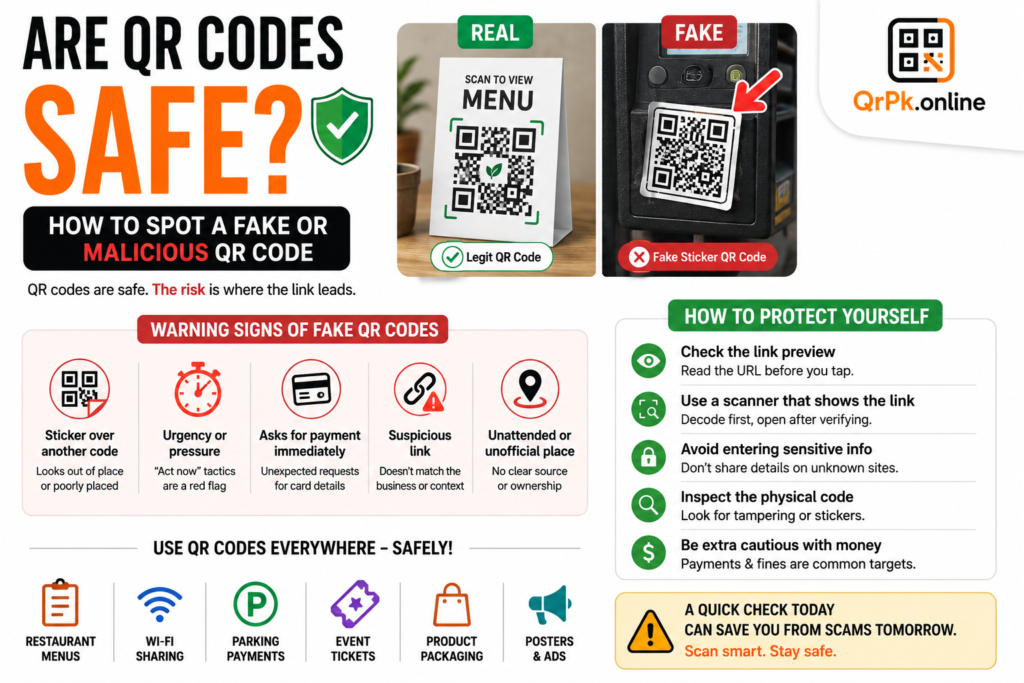
How QR Code Scams Actually Work
The scam itself is refreshingly low-tech, which is part of why it works. Someone prints a fake QR code sticker that looks similar to a legitimate one, and places it directly over a real code in a public location — a parking payment machine, a restaurant table, a poster, or a retail payment counter. When someone scans it expecting to reach the legitimate destination, they’re instead redirected to a fake website designed to steal payment information, login credentials, or personal details.
Common places these scams have been reported include:
- Parking meters and payment stations — fake codes redirecting to fraudulent payment pages that steal card details.
- Restaurant tables — fake menu codes leading to phishing pages or malicious downloads instead of the actual menu.
- Public posters and flyers — codes claiming to offer a discount, prize, or giveaway that instead lead to scam sites.
- Fake parking or traffic fine notices — QR codes on fraudulent notices placed on windshields, directing to fake payment portals.
The reason this works so well is simple: most people scan a QR code and tap through without pausing to actually check where it’s taking them. A regular link in an email might trigger some hesitation, but a QR code feels more “official” simply because it’s printed and physical.
Warning Signs of a Fake or Suspicious QR Code
A sticker that looks slightly out of place. If a QR code looks like it’s been placed on top of another sticker, has different printing quality than everything around it, or is positioned slightly crookedly compared to the surrounding design, treat it with suspicion.
Urgency or pressure in the surrounding text. Scam QR codes are often paired with language designed to make you act fast without thinking — “Pay immediately to avoid a fine,” “Limited time offer, scan now,” or similar pressure tactics.
A request for payment information immediately after scanning. Legitimate menus, Wi-Fi codes, or informational codes rarely ask for card details right away. If scanning a code leads straight to a payment form, especially somewhere you weren’t expecting to pay, pause and verify.
A link that doesn’t match the business or context. If a QR code at a specific restaurant leads to a completely unrelated or unfamiliar domain name, that’s a clear red flag.
Codes found in unattended or unofficial-looking locations. A QR code stuck loosely on a public pole, a printed flyer with no clear business branding, or a code with no visible source is riskier than one displayed on an official, staffed counter.
How to Protect Yourself
Check the link preview before tapping through. Most modern phone cameras show a preview of the destination URL before actually opening it. Take two seconds to glance at it — misspelled domains, unusual extensions, or unfamiliar websites are red flags worth stopping for.
Use a QR scanner that decodes before opening. A dedicated QR code scanner that shows you the decoded link or content before automatically launching it gives you a clear chance to verify the destination first, rather than being redirected instantly.
Avoid entering sensitive information immediately after scanning an unfamiliar code. If a code leads to a login page or payment form, especially somewhere you weren’t expecting one, verify independently — for example, by checking the business’s official website or app directly instead.
Inspect the physical code when possible. For codes in public places like parking meters, a quick glance to check whether it looks like a sticker placed over something else can save you from a scam entirely.
Be extra cautious with codes tied to money. Parking payments, fines, and donation requests are the most common targets for QR scams specifically because they involve payment information. Treat any QR-driven payment request with a bit more scrutiny than a typical menu or Wi-Fi code.
Are QR Codes on Legitimate Websites and Apps Safe?
Yes — a QR code generated by a reputable, well-known business, displayed on their official app, website, or verified marketing material, carries essentially the same safety level as clicking a normal link on their site. The risk isn’t inherent to QR codes as a technology; it’s specifically about codes placed by unknown or unverified sources in public settings, where anyone can physically stick a fake one over a real one.
Also Read > How to Reduce Image Size for Email, WhatsApp, or Website Uploads (Without Ruining Quality)
Frequently Asked Questions
Can a QR code install malware just by scanning it?
Simply scanning a QR code with your camera doesn’t automatically install anything — the risk comes from what happens after, such as tapping through to a malicious website or downloading a file from an untrusted source. Being cautious about where the link leads is what actually matters.
How can I check where a QR code leads before opening it?
Most phone cameras display a link preview before you tap to open it — read this carefully. Alternatively, a QR scanner tool that shows the decoded content first, rather than opening it automatically, gives you extra time to review it.
Is it safe to scan a QR code on a restaurant menu?
Generally yes, especially at established, staffed restaurants, but it’s still worth a quick glance to confirm the code hasn’t been tampered with, particularly if it looks like a separate sticker placed over the table.
What should I do if I scanned a malicious QR code and entered information?
If you entered payment details, contact your bank or card provider immediately to monitor for fraudulent activity. If you entered login credentials, change that password right away, especially if you reused it anywhere else.
Final Thought
QR codes aren’t inherently risky — they’re just a convenient way to store a link. The actual danger comes from trusting a code without checking where it leads, especially in public, unattended locations where anyone can print and stick up a fake one. A quick glance at the link preview before tapping through is a small habit that closes almost the entire risk gap.