Quick answer: The fastest way to reduce an image’s file size is to use a free online image compressor, which shrinks the file in kilobytes while keeping the photo looking almost identical to the original. This works better than resizing dimensions alone, and takes a few seconds with no software needed.
If you’ve ever tried to attach a photo to an email and gotten an error about file size limits, or watched WhatsApp crush your image into a blurry mess, or had a website tell you your upload is “too large,” you already know this problem well. Let’s fix it properly.
Why Does This Even Happen?
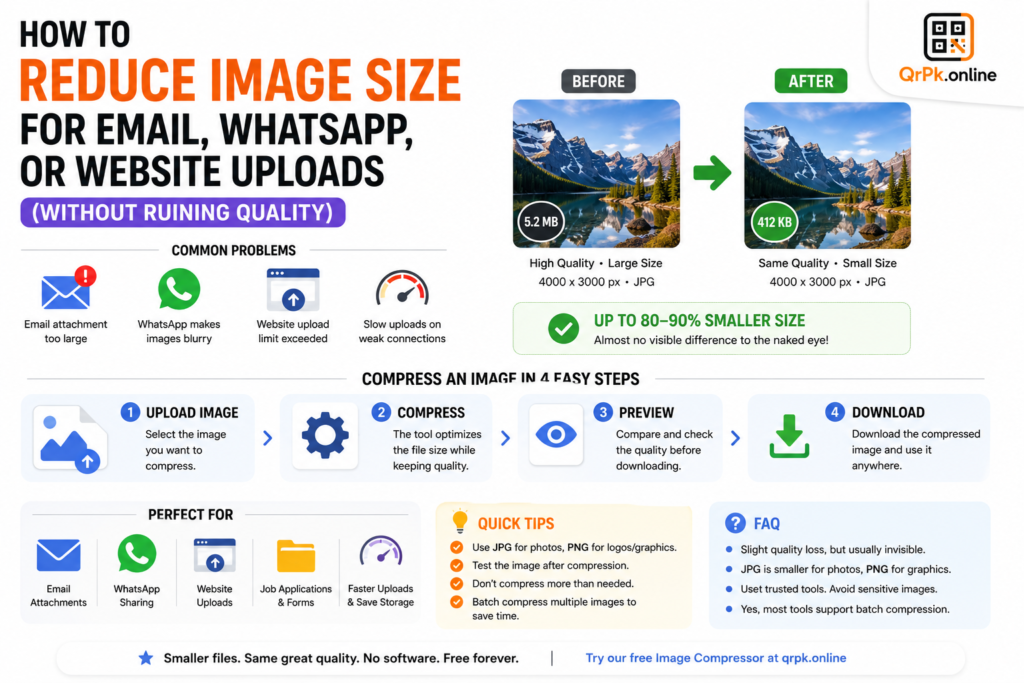
Modern phone cameras take genuinely excellent photos — which also means genuinely large file sizes. A single photo from a recent smartphone can easily be 3-8 MB, sometimes more. But most platforms have limits:
- Gmail attachments cap out around 25 MB total per email — fine for one photo, but you’ll hit the wall fast with several.
- WhatsApp automatically compresses images sent through chat, often making them noticeably blurrier than the original.
- Many websites and web forms cap individual image uploads at 1-2 MB, especially for profile pictures, resumes, or application forms.
- Slow internet connections make large image uploads painfully slow, or cause them to fail entirely.
The instinct a lot of people have is to just screenshot the photo (which actually reduces quality further and doesn’t reliably shrink file size) or resize the image dimensions smaller. Both are workarounds for the wrong problem. What you actually want is compression — reducing the file size while keeping the visual quality as close to the original as possible.
Compression vs Resizing: What’s the Difference?
This trips a lot of people up, so it’s worth being clear about it.
Resizing changes the physical dimensions of the image — for example, shrinking a photo from 4000×3000 pixels down to 1200×900 pixels. This does reduce file size, but it also makes the image physically smaller and can look pixelated if displayed at a larger size later.
Compression keeps the dimensions the same but reduces the file size by optimizing how the image data is stored — removing redundant information the human eye barely notices anyway. A well-compressed image can look nearly identical to the original while being a fraction of the file size.
For most everyday needs — emailing a photo, uploading to a website, sending on WhatsApp — compression is the better tool, since it solves the file-size problem without shrinking how the image actually looks or displays.
How to Compress an Image in Under a Minute
- Open a free online image compressor.
- Upload the photo you need to shrink.
- The tool automatically reduces the file size while preserving visual quality.
- Download the compressed version and use it wherever you need — email, WhatsApp, a website form, or a job application.
No software installation, no learning curve, and it works directly in your browser regardless of whether you’re on a phone, laptop, or tablet.
Real Situations Where This Actually Matters
Sending photos by email without the “attachment too large” error. If you’re attaching multiple high-resolution photos to a single email — for work, a portfolio, or personal use — compressing each one first keeps you comfortably under most email size limits.
Uploading a profile picture or document photo to a website. A lot of online forms, job applications, and government portals have strict file size limits, sometimes as small as 200 KB to 1 MB. Compression is often the only realistic way to meet that limit without the photo looking noticeably worse.
Speeding up website load times. If you run a blog, online store, or portfolio site, large uncompressed images are one of the most common reasons websites load slowly — which affects both visitor experience and search engine ranking. Compressing images before uploading them keeps your site fast without sacrificing visual quality.
Sending clearer photos over WhatsApp. Since WhatsApp automatically compresses images anyway (often harshly), sending a smartly pre-compressed image sometimes results in a cleaner final result than letting WhatsApp’s own aggressive compression handle a massive original file.
Saving phone storage space. If your phone is constantly warning you about low storage, compressing your existing photo library (especially ones you don’t need in full resolution anymore) can free up meaningful space without deleting anything.
Also Read > How to Make a QR Code for Your Instagram Profile (Free, in Under a Minute)
How Much Can You Actually Shrink a Photo?
It varies depending on the original image, but it’s common to reduce a photo’s file size by 60-90% with barely any visible difference to the naked eye, especially for photos that will be viewed on a phone or computer screen rather than printed large. A 5 MB photo straight from a smartphone can often be compressed down to under 500 KB while still looking sharp on any normal screen.
Frequently Asked Questions
Does compressing an image reduce its quality?
There’s a small amount of quality loss with most compression methods, but a good compressor is designed to make this practically invisible to the eye at normal viewing sizes, while significantly reducing the file size in kilobytes or megabytes.
What’s the best file format for a smaller file size — JPG or PNG?
JPG is generally much smaller in file size and better suited for photos, while PNG is better for graphics, logos, or images requiring transparency, but results in larger files. For most everyday photos, JPG combined with compression gives the best balance.
Is it safe to use a free online image compressor?
Reputable compressors process the image and don’t store or misuse it afterward, but as a general practice, avoid uploading highly sensitive images (like ID documents) to any online tool unless you trust its privacy handling.
Can I compress multiple images at once?
Many online compressors support uploading and compressing several images in a single batch, which is especially useful when preparing a large set of photos for a website or portfolio.
Final Thought
Large image files are one of those small, everyday frustrations that have an easy fix most people simply don’t know about. Instead of resizing awkwardly or dealing with rejected uploads, a quick free compression tool solves the actual problem — smaller files, same great-looking photo — in about ten seconds.
- How to Create a QR Code for JazzCash, Easypaisa, or Bank Transfer Payments

- How to Create a WhatsApp QR Code (Click-to-Chat, No Coding Needed)

- How to Create a QR Code Menu for Your Restaurant (Free, Step-by-Step)

- How to Add a Logo to Your QR Code (Without Breaking the Scan)

- Are QR Codes Safe? How to Spot a Fake or Malicious QR Code

- How to Reduce Image Size for Email, WhatsApp, or Website Uploads (Without Ruining Quality)

- How to Make a QR Code for Your Instagram Profile (Free, in Under a Minute)

- Static vs Dynamic QR Code: What’s the Difference and Which One Should You Use?