Think about the last networking event, conference, or business meeting you attended. How many paper business cards did you walk away with? And be honest — how many of those actually made it into your contacts list, versus sitting in a jacket pocket or a desk drawer until you eventually threw them out?
This exact scenario is why digital business cards, powered by a simple QR code, have quietly become one of the most practical upgrades a professional can make. It’s not about looking trendy — it’s about solving a genuinely annoying, universal problem.
The Real Problem With Paper Business Cards
Paper cards have a few built-in flaws that we’ve just gotten used to tolerating:
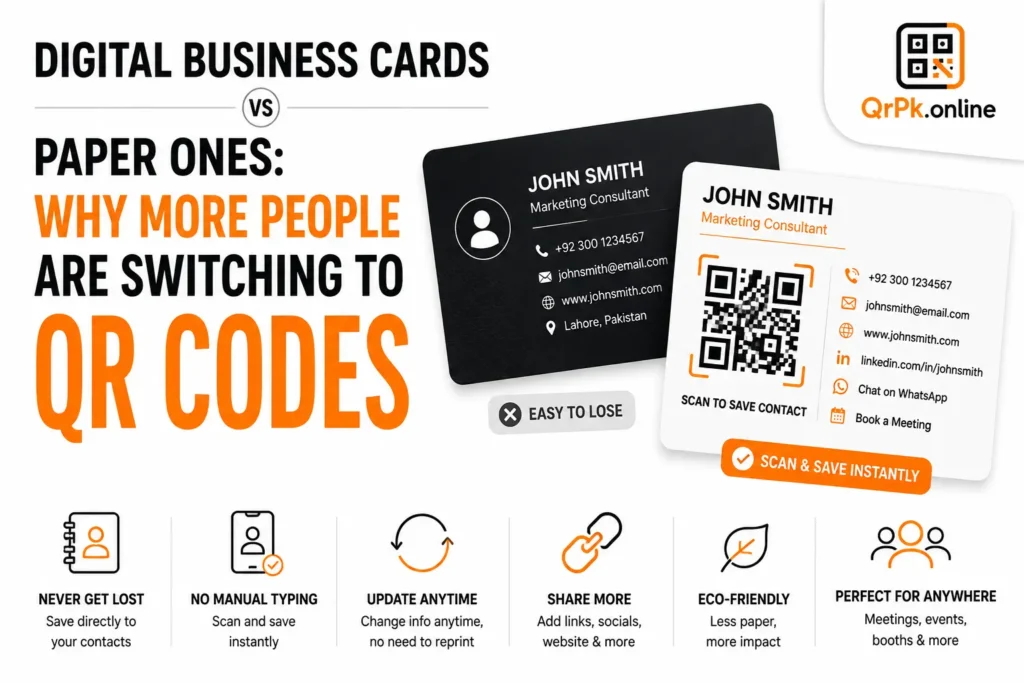
They get lost. A card sitting in a wallet or bag is easy to misplace, and once it’s gone, so is that contact — unless you happened to also save the information somewhere else.
They require manual data entry. Even when you do keep a card, someone still has to type the name, number, and email into their phone manually, which is tedious enough that a lot of people just… don’t.
They can’t be updated. If you change your phone number, job title, or company, every card you’ve already handed out is now outdated. There’s no fixing that after the fact.
They run out. You either carry a stack everywhere or risk being at an event with none left in your pocket at the exact moment you need one.
They’re one-directional. A paper card gives someone your information, but that’s it — no link to your portfolio, social profiles, website, or anything else that might actually help someone decide to work with you.
How a QR Code Business Card Fixes This
A QR code business card works by encoding your contact information directly into a scannable code. When someone scans it with their phone camera, their phone typically offers to save your details directly as a new contact — no typing required, no errors from handwriting or mishearing a phone number.
Depending on how it’s set up, a QR code business card can include:
- Your name, job title, and company
- Phone number and email
- A link to your website, portfolio, or LinkedIn profile
- Social media handles
- Even a direct link to schedule a meeting or send a WhatsApp message
And here’s the part that makes it genuinely more useful than paper: if any of that information changes, you can often update what the code points to without needing to reprint or redistribute anything — assuming you’re using a code linked to a live page rather than one with the contact details hard-coded directly into it.
Also Read > Free Online Barcode Generator: A Practical Guide for Small Businesses and Everyday Use
Where a Digital Business Card Actually Gets Used
On an actual printed card. This is the most common approach — a normal-looking business card, but with a QR code printed in the corner. You get the best of both worlds: something physical to hand over, plus a fast, error-free way for the other person to save your details.
As a phone or laptop wallpaper. Freelancers and consultants sometimes keep a QR code business card as their lock screen, so it’s always available to show someone on the spot, even without a printed card in hand.
On email signatures and social profiles. Adding a small QR code to an email footer or bio gives people an easy way to save your contact info directly from their phone if they see the code on a screen during a call or presentation.
At events, booths, and conferences. Instead of running out of printed cards, a single QR code displayed on a screen or banner can be scanned by dozens of people at once, all saving accurate contact information instantly.
Does This Mean Paper Cards Are Obsolete?
Not necessarily — there’s still something to be said for the physical act of handing someone a card; it feels more personal and deliberate in certain settings, especially in more traditional business cultures. The smartest approach for most professionals isn’t choosing one over the other, but combining them: a nicely designed printed card that also includes a QR code, giving the other person the choice of either keeping the physical card or scanning it to save your details instantly and accurately.
How to Create One
Setting this up doesn’t require any design or technical skills. Our free business card QR maker lets you enter your contact details, generate a scannable QR code instantly, and download it to add to your printed cards, digital signature, or social profiles — all directly in your browser, no account needed.
Frequently Asked Questions
Does scanning a business card QR code cost anything or require an app?
No — on virtually all modern smartphones, the built-in camera app can scan the code directly, and the phone will prompt to save the contact automatically.
Can I update the information after the QR code is already printed?
It depends on how the code is generated. Codes that link to a live, editable page can be updated anytime; codes with contact details encoded directly cannot be changed once printed, since the information is fixed inside the code itself.
Is a QR code business card as professional as a traditional paper one?
Increasingly, yes — many professionals see it as more modern and thoughtful, since it eliminates manual data entry errors and shows attention to a smoother experience for the person you’re networking with.
What information should I include on a business card QR code?
At minimum, your name, role, phone number, and email. Beyond that, a link to your portfolio, LinkedIn, or website adds real value without cluttering a physical card design.
Final Thought
The humble business card hasn’t disappeared — it’s just evolving. Pairing a traditional card with a QR code removes the small but real friction of manual contact-saving, cuts down on lost information, and gives people an easy way to explore more about you beyond a phone number and a name. It takes two minutes to set up, and it’s the kind of small upgrade people notice.
- How to Create a QR Code for JazzCash, Easypaisa, or Bank Transfer Payments
- How to Create a WhatsApp QR Code (Click-to-Chat, No Coding Needed)
- How to Create a QR Code Menu for Your Restaurant (Free, Step-by-Step)
- How to Add a Logo to Your QR Code (Without Breaking the Scan)
- Are QR Codes Safe? How to Spot a Fake or Malicious QR Code
- How to Reduce Image Size for Email, WhatsApp, or Website Uploads (Without Ruining Quality)
- How to Make a QR Code for Your Instagram Profile (Free, in Under a Minute)
- Static vs Dynamic QR Code: What’s the Difference and Which One Should You Use?